|
Original† (132,666 colors)
Full resolution (743 × 1,155 pixels). |
Mosaic image filter =============> with assembly instructions |
Mosaic (35 colors, 28,757 tiles @ 5 x 6 pixels)
Full resolution (745 × 1,158 pixels). |
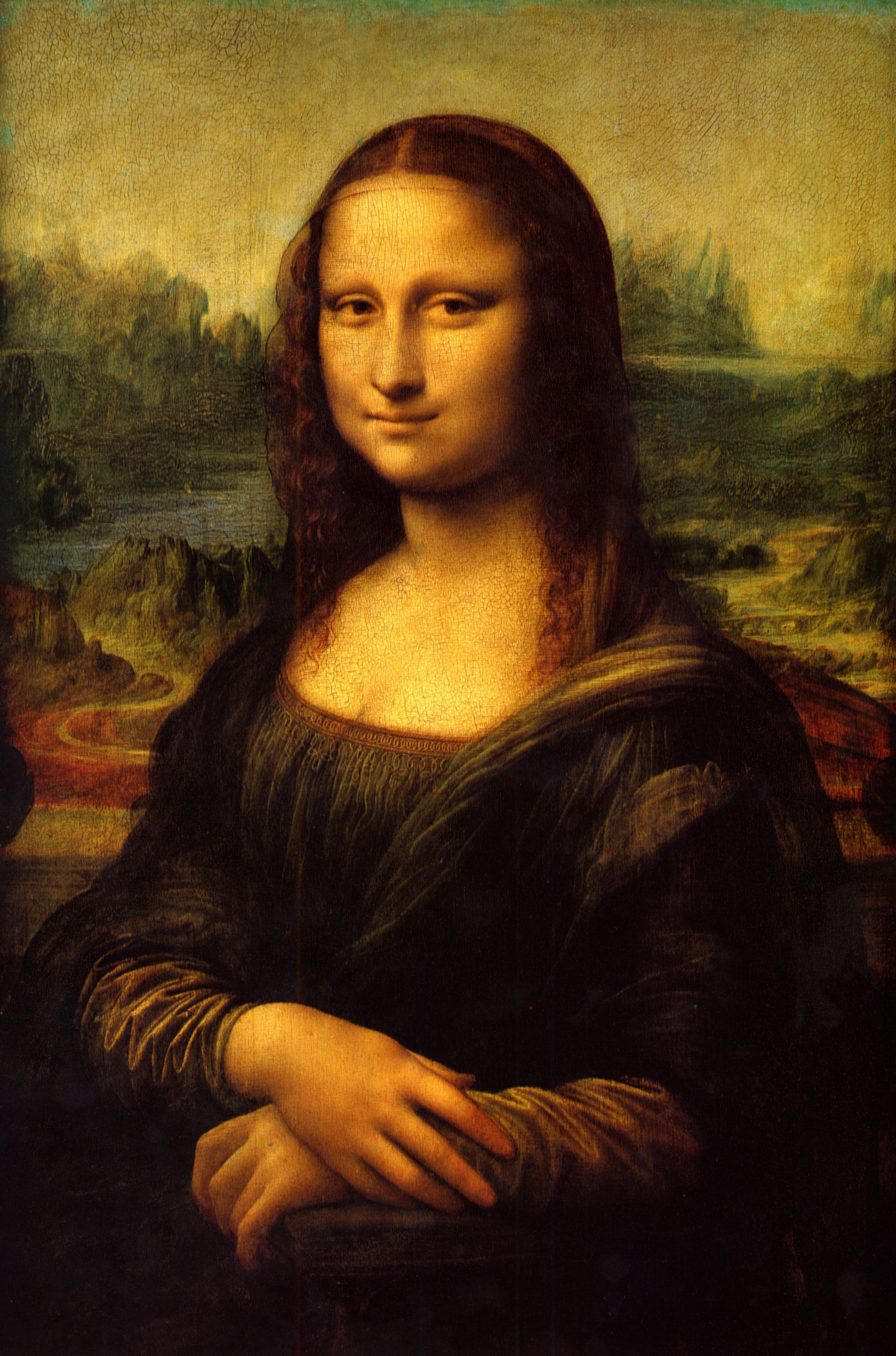
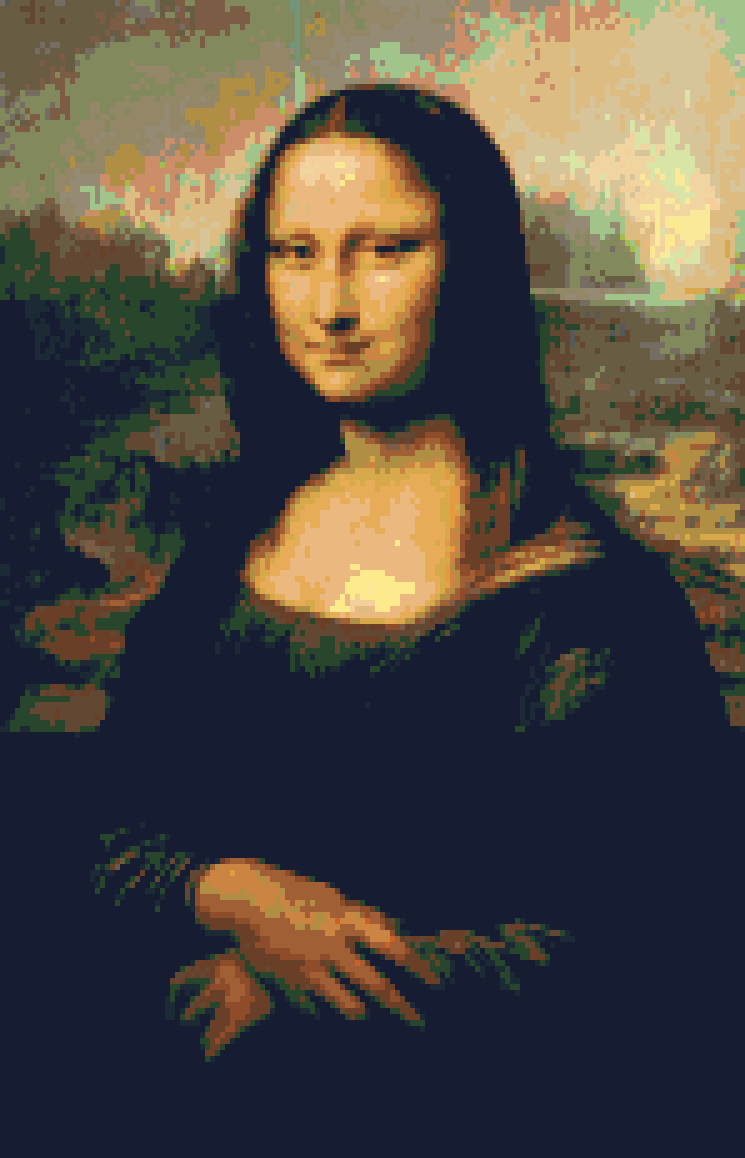
My attention was grabbed recently by various artists creating mosaics with such items as LEGO™ bricks, photo collections or plain wooden tiles. These works got me thinking about the complexities behind their creations. In turn, this led me to ponder whether I could accomplish something similar, given my artistic deficiencies. Accordingly, I decided to tackle the "simplest" task, namely creating a filter that would convert an image into a mosaic of rectangular or square "tiles", each of a single color. Moreover, I would want it to generate a blueprint for assembling the resulting mosaic.
To accomplish my goal, I decided to use what I know best, namely Perl with ImageMagick's drawing primitives accessed through its PerlMagick interface. Another important consideration is selecting a color chart for the tiles. Too few colors would yield in an unrecognizable result or, at best, something Andy Warhol might have created. With the images of LEGO™ art still fresh in my mind and for the purpose of this presentation, I decided to use a color palette based on the LEGO™ Color Chart, wherein only the opaque colors are retained.
The basic task is readily identifiable. Given an area of the original image, compute the mean red, green and blue values of all the pixels. Compare these averages to the rgb values of each tile in the color chart. Select the tile that comes "closest", that is the one that minimizes a metric of rgb values. Finally, fill in the area with the tile's color. Repeat the process for all possible areas.
The Perl script img2mosaic.pl, displayed below, implements this algorithm. It is released for personal, non-commercial and non-profit use only. The listing includes the line numbers in order to reference them in the following general remarks.
- Lines 001-004: Declaration of the required imports.
- Lines 008-013: Description of the required command line parameters. For the above "Mona Lisa" image,
the command is:
perl img2mosaic.pl Mona_Lisa.jpg legoChart.txt 5 6
Note that the "Verbose" parameter can be omitted or set to "0" to suppress the computational results for each tile. If set, say "1", then the details will be displayed. The following line is a typical example:
Tile# 193,1 @ 0,0-4,5: 100.6 116.8 81.2 => 168-GunMetallic
The tile number follows a matrix notation with the row number (193) followed by the column number(1). The corresponding image coordinates are stated next with the top right corner (0,0) followed by the bottom left corner (5,4). The next three numbers are the average values of the rgb intensities in that order. Finally, the name of the best matching tile is printed.BTW, the tile dimension of 5 x 6 pixels was chosen for no other reason than the width to height ratio of an interlocked unit LEGO™ brick is 5 to 6 (see http://www.owlnet.rice.edu/~elec201/Book/legos.html).
- Lines 015-017: The program generates two output files, the mosaic image as a GIF file and a
plain ASCII text file for the assembly instructions. For the above "Mona Lisa" example, those files are
Mona_Lisa_5x6_px_tiles.gif
Mona_Lisa_5x6_px_tiles.txt
- Lines 023-024: Outputs the title of the program after clearing the screen if running MS Windows.
- Lines 026-032: Retrieves the command-line arguments and checks for errors.
- Lines 034-039: Composes the names for the output files.
- Lines 041-043: Reads the color chart file (see below) and loads the data
into the hash "%ColorChart". Each line of the file consists of a tile name as the key and a string of
space-seperated hexadecimal rgb intensities as the value. For example, the first record is
'1-White' => 'F2 F3 F2',
Note that the key is composite. The left hand side of the hyphen is an id code that is used to reference the tile in the assembly instructions (see below). In this particular case, it's the official LEGO™ brick code which insures uniqueness. The right hand side of the hyphen is just a name for the color. - Lines 045-060: Repackages the color-chart data into different formats to meet subsequent needs. Referring
again to the first entry in the color chart, we'll end up with
@{ $TileRGB{ '1-White' } } = (242,243,242) (used for finding the best matching tile),
$TileColor{ '1-White' } = '#F2F3F2' (used for drawing the tile), and
$TileId{ '1-White' } = 1 (used for referencing the tile in the assembly instructions).
- Lines 066-070: Uses PerlMagick's "Ping" function to get the width and height of the source image.
- Lines 072-077: Establishes an integral number of tile rows and columns given the dimensions of the original image and those of a unit tile.
- Lines 079-084: The last preliminary step where the mosaic image is initialized as a GIF duplicate of the source image but scaled to insure an integral number of horizontal and vertical tiles.
- Lines 086-098: Echoes the initialization results.
- Lines 112-122: The two nested loops control the order in which we create the mosaic. The iterations unfold from left to right, bottom to top, with each one creating a single tile. This order was chosen as being the natural one if the mosaic was to be built with LEGO™ bricks. Thus "Row #1" is the bottom row. Note also that in the ImageMagick coordinate system, the origin (0,0) is located at the top left corner.
- Lines 128-151: The core of the algorithm where the best matching tile is determined for the image area under consideration. The scalar results from three calls to Subroutine "meanColor" are the arguments for the call to Subroutine "bestTileMatch". Each call to "meanColor" requires the argument to be an array of normalized intensities for a given color channel obtained in turn with PerlMagick's "GetPixels" function. The use of normalized values avoids knowing beforehand the color depth of the source image. The returned average color from "meanColor" is renormalized as an 8-bit value so as to be in the range 0 to 255. With the three average channel values being fed into "bestTileMatch", the name of the best matching tile is returned.
- Lines 152-153: These two statements update the assembly instructions ($Blueprint) and the tile inventory (%TileCounts).
- Lines 155-158: The original image area is overdrawn with a filled rectangle/square of uniform color as dictated by the color parameters for the best matching tile.
- Line 160: Delineates the end of the row in the assembly instructions with a newline marker.
- Line 162: Outputs the mosaic image to disk.
- Lines 167-170: Prints the header for the assembly instructions where the total number of required tiles is broken down.
- Lines 173-188: Outputs the assembly instructions with runs of a given title type aggregated
(see below). For example, consider
Row# 17: 149[41] 141 26 149[106]
It means that the 17th row consists of 41 tiles with id "149", corresponding to the tile named "149-BlackMetallic" as declared in the color chart. Single instances of Tile "141" and "26" follow next. Finally there's another run of "149" tiles, this time 106 of them. - Lines 214-236: Defines the subroutine to finding the best matching tile. A match is assessed using the square of the Euclidean metric in the rgb space. As the metric must be evaluated for all possible tiles, this portion of the program is computationally intensive. Nevertheless, the routine is fast: on a 3GHz XP box, the aforementioned "Mona Lisa" mosaic takes roughly 33 seconds in quiet mode.
- Lines 246-253: Defines the subroutine for computing the mean channel value. The mean of the normalized input values is multiplied by 256 to yield an 8-bit return value.
If this mosaic were to be built, it would be roughly 1.2 x 1.9 meters. Anyway, if you have any questions regarding the code or my explanations, please do not hesitate in contacting me.
BTW, for photo-mosaics instead, one needs to replace the handling of a color chart with that of a database of mean rgb values for a collection of thumbnail images.
001 use strict;
002 use File::Basename;
003 use FileHandle;
004 use Image::Magick;
005 #===== Copyright 2008, Webpraxis Consulting Ltd. - ALL RIGHTS RESERVED - Email: webpraxis@gmail.com ============================
006 # img2mosaic.pl: Mosaic image filter with assembly instructions.
007 #===============================================================================================================================
008 # Usage : perl img2mosaic.pl ImageFile ColorChartFile TileWidth TileHeight Verbose
009 # Arguments : ImageFile = path of image file to be filtered.
010 # ColorChartFile = path of text file containing the hash declarations for the color chart.
011 # TileWidth = width of a tile in pixels
012 # TileHeight = height of a tile in pixels
013 # Verbose = boolean flag for verbose output
014 # Input Files : See arguments.
015 # Output Files : Mosaic GIF file in the form "basename_wxh_px_tiles.gif" where "basename" denotes the basename of the
016 # source image file, "w" the tile width and "h" the tile height.
017 # Mosaic text assembly instructions in the form "basename_wxh_px_tiles.txt".
018 # Temporary Files : None.
019 # Remarks : Requires PerlMagick. Used module from ImageMagick 6.3.7.
020 # History : v1.0.0 - January 24, 2008 - Original release.
021 #===============================================================================================================================
022 # 0) INITIALIZE:
023 system( 'cls' ) if $^O =~ /^MSWin/; #clear screen if running Windows
024 print "$0\n", '=' x length($0), "\n\n"; #display program name
025
026 my $SourceFile = shift || die 'ERROR: No image file specified'; #get path of source image file
027 my $ChartFile = shift || die 'ERROR: No color-chart file specified'; #get path of color-chart file
028 my $TileWidth = shift || die 'ERROR: No tile width specified'; #get pixel width of a tile
029 my $TileHeight = shift || die 'ERROR: No tile height specified'; #get pixel height of a tile
030 my $Verbose = shift; #get boolean flag for verbose mode
031 die 'ERROR: Cannot locate image file' unless -e $SourceFile;
032 die 'ERROR: Cannot locate color-chart file' unless -e $ChartFile;
033
034 my ( $basename, #extract basename &
035 $path #extract path
036 ) = fileparse( $SourceFile, '\..*' ); # of source image file
037 my $MosaicFile = "$path${basename}_${TileWidth}x${TileHeight}_px_tiles.gif"; #compose filename of mosaic image
038 my $ReportFile = "$path${basename}_${TileWidth}x${TileHeight}_px_tiles.txt"; #compose filename of report
039 local *REPORT; #define filehandle for the report
040
041 my %ColorChart; #hash of tile id codes => rgb color values
042 push @ARGV, $ChartFile; #set up reading of color chart
043 eval '%ColorChart = (' . join( '', <> ) . ')'; #load chart into hash
044
045 my %TileRGB; #hash of arrays for each color channel value
046 my %TileColor; #hash of rgb fill attributes
047 my %TileId; #hash of tile id codes
048 { #start naked block
049 my $key; # chart hash key
050 my $value; # chart hash value
051 my @rgb; # array of rgb channel colors
052
053 while( ( $key, $value ) = each %ColorChart ) { # repeat for each chart entry
054 @rgb = split / /, $value; # extract hex channel colors
055 push @{ $TileRGB{ $key } }, hex for @rgb; # create RGB array of decimal values
056 $TileColor{ $key } = '#' . join '', @rgb; # create rgb fill attribute
057 $TileId{ $key } = ( split /-/, $key )[0]; # extract tile id code
058 } # until all chart entries processed
059 } #end naked block
060 undef %ColorChart; #discard the color chart
061
062 my %TileCounts; #hash for tile totals per type
063 my $Blueprint; #mosaic assembly instructions
064 #-------------------------------------------------------------------------------------------------------------------------------
065 # 1) SETUP MOSAIC IMAGE:
066 my $source = Image::Magick->new; #instantiate an image object for the source
067 my ( $SourceWidth, #get width &
068 $SourceHeight #get height
069 ) = ( $source->Ping( $SourceFile ) )[0,1]; #of source
070 undef $source; #destroy the image object for the source
071
072 my $No_Tile_Cols = $SourceWidth / $TileWidth; #compute raw number of tile columns
073 $No_Tile_Cols = int( ++$No_Tile_Cols ) #adjust to an integral number
074 unless $No_Tile_Cols == int( $No_Tile_Cols ); # if necessary
075 my $No_Tile_Rows = $SourceHeight / $TileHeight; #compute raw number of tile rows
076 $No_Tile_Rows = int( ++$No_Tile_Rows ) #adjust to an integral number
077 unless $No_Tile_Rows == int( $No_Tile_Rows ); # if necessary
078
079 my $MosaicWidth = $No_Tile_Cols * $TileWidth; #compute pixel width of mosaic image
080 my $MosaicHeight = $No_Tile_Rows * $TileHeight; #compute pixel height of mosaic image
081 my $Mosaic = Image::Magick->new( magick=>"GIF" ); #instantiate an image object for the mosaic
082 $Mosaic->Read( $SourceFile ); #init mosaic with source image file
083 $Mosaic->Quantize( colors=>scalar keys %TileColor, colorspace=>'RGB' ); #insure correct colorspace
084 $Mosaic->Scale( width=>$MosaicWidth, height=>$MosaicHeight ); #scale mosaic image
085
086 print "Source Image: $SourceFile\n", #echo initialization results
087 " Width: $SourceWidth px\n",
088 " Height: $SourceHeight px\n",
089 "Mosaic Image: $MosaicFile\n",
090 " Width: $MosaicWidth px\n",
091 " Height: $MosaicHeight px\n",
092 "Report File: $ReportFile\n\n",
093 "Mosaic Details: ", $No_Tile_Cols * $No_Tile_Rows, " tiles\n",
094 " No. of rows: $No_Tile_Rows\n",
095 " No. of cols: $No_Tile_Cols\n",
096 " Tile width: $TileWidth px\n",
097 " Tile height: $TileHeight px\n\n";
098 print( "Pause. Press the ENTER key to continue..." ), <STDIN> if $Verbose;
099 #-------------------------------------------------------------------------------------------------------------------------------
100 # 2) CREATE MOSAIC IMAGE:
101 { #start naked block
102 my $best_tile; # name of best matching tile
103 my $colNo; # tile column number
104 my $rowNo; # tile row number
105 my $geometry; # geometry of a tile: width, height & x,y offsets
106 my $x_top_left; # x-coordinate of a tile's top-left corner
107 my $y_top_left; # y-coordinate of a tile's top-left corner
108 my $x_bottom_right; # x-coordinate of a tile's bottom-right corner
109 my $y_bottom_right; # y-coordinate of a tile's bottom-right corner
110
111 print "Creating mosaic image...\n";
112 for ( $y_top_left = $MosaicHeight - $TileHeight; # for each tile row: start at bottom and work up
113 $y_top_left >= 0;
114 $y_top_left -= $TileHeight
115 ) {
116 ++$rowNo; # update tile row number
117 $colNo = 0; # reset tile column number
118 $y_bottom_right = $y_top_left + $TileHeight - 1; # compute y-coord. of the tile's bottom-right corner
119 for ( $x_top_left = 0; # for each tile column: work left to right
120 $x_top_left < $MosaicWidth - 1;
121 $x_top_left += $TileWidth
122 ) {
123 ++$colNo; # update tile column number
124 $x_bottom_right = $x_top_left + $TileWidth - 1; # compute x-coord. of the tile's bottom-right corner
125 print "\tTile# $rowNo,$colNo \@ $x_top_left,$y_top_left-$x_bottom_right,$y_bottom_right: "
126 if $Verbose; # report progress if requested
127
128 $geometry = "${TileWidth}x${TileHeight}+$x_top_left+$y_top_left"; # define tile geometry
129 $best_tile = &bestTileMatch # match mean image-area colors to a tile
130 ( &meanColor # compute mean red color
131 ( $Mosaic->GetPixels # get normalized red intensities of all pixels
132 ( map => 'r',
133 geometry => $geometry,
134 normalize => 'true'
135 )
136 ),
137 &meanColor # compute mean green color
138 ( $Mosaic->GetPixels # get normalized green intensities of all pixels
139 ( map => 'g',
140 geometry => $geometry,
141 normalize => 'true'
142 )
143 ),
144 &meanColor # compute mean blue color
145 ( $Mosaic->GetPixels # get normalized blue intensities of all pixels
146 ( map => 'b',
147 geometry => $geometry,
148 normalize => 'true'
149 )
150 )
151 );
152 $Blueprint .= "$TileId{ $best_tile } "; # add tile id to assembly instructions
153 ++$TileCounts{ $best_tile }; # update corresponding tile total
154
155 $Mosaic->Draw( primitive => 'rectangle', # replace image subregion with tile
156 fill => $TileColor{ $best_tile },
157 points => "$x_top_left,$y_top_left $x_bottom_right,$y_bottom_right"
158 );
159 } # until all tile columns processed
160 $Blueprint .= "\n"; # mark end of row in assembly blueprint
161 } # until all tile rows processed
162 $Mosaic->Write( filename => $MosaicFile ); # save the mosaic to file
163 undef $Mosaic; # destroy the mosaic image object
164 } #end naked block
165 #-------------------------------------------------------------------------------------------------------------------------------
166 # 3) REPORT TILE BREAKDOWN:
167 open REPORT, ">$ReportFile";
168 print "\nWriting the report...\n\n";
169 print REPORT "Tile Totals: ", $No_Tile_Rows * $No_Tile_Cols, " ($No_Tile_Rows rows x $No_Tile_Cols columns)\n\n";
170 printf REPORT "\t%-25s: %d\n", $_, $TileCounts{$_} for sort keys %TileCounts;
171 #-------------------------------------------------------------------------------------------------------------------------------
172 # 4) REPORT AGGREGATED BLUEPRINT:
173 { #start naked block
174 my $repetitions; # number of tile-id repetitions
175
176 print REPORT "\nBlueprint (bottom to top, left to right):\n\n"; # report header
177 study $Blueprint; # prep for substitutions
178 for ( map{ $TileId{ $_ } } keys %TileCounts ) { # for each id of tile present
179 for ( $repetitions = $No_Tile_Cols; $repetitions > 1; --$repetitions ) { # for each possible repetition
180 $Blueprint =~ s/($_ ){$repetitions}/"$_\[$repetitions\] "/esg; # aggregate
181 } # until all repetitions examined
182 } # until all tile ids processed
183
184 REPORT->format_name( "BLUEPRINT" ); # declare report format for blueprint
185 $: = " "; # set the line-break character
186 write REPORT for split /\n/, $Blueprint; # output assembly instructions
187 } #end naked block
188 close REPORT;
189 print "\a\nDone!\n"; #report end of processing
190 exit; #end processing
191 #===== FORMATS =================================================================================================================
192 { #start naked block
193 my $rowNo; # blueprint row number
194
195 format BLUEPRINT = # format for reporting the assembly instructions
196 Row# @>>: ^<<<<<<<<<<<<<<<<<<<<<<<<<<<<<<<<<<<<<<<<<<<<<<<<<<<<<<<<<<<<<<<<<<<<<
197 ++$rowNo, $_
198 ^<<<<<<<<<<<<<<<<<<<<<<<<<<<<<<<<<<<<<<<<<<<<<<<<<<<<<<<<<<<<<<<<<<<<<~~
199 $_
200 .
201 } #end naked block
202
203 #===== SUBROUTINES =============================================================================================================
204 # Usage : &bestTileMatch( $RED, $GREEN, $BLUE );
205 # Purpose : Matches a tile to the mean RGB channel values of an image area.
206 # Arguments : $RED = mean 8-bit red color
207 # $GREEN = mean 8-bit green color
208 # $BLUE = mean 8-bit blue color
209 # Externals : $TileRGB, $Verbose
210 # Subs : None.
211 # Remarks : None.
212 # History : v1.0.0 - January 23, 2008 - Original release.
213
214 sub bestTileMatch { #begin sub
215 my ( $red, $green, $blue ) = @_; # parametrize the arguments
216 my $bestTile; # name of tile that best matches mean color
217 my $deltaRed; # difference in red color values
218 my $deltaGreen; # difference in green color values
219 my $deltaBlue; # difference in blue color values
220 my $key; # hash key = tile name
221 my $value; # hash value = array of channel color intensities
222 my $metric; # squared Euclidean metric of intensities
223 my $minMetric = 65536 * 65536; # minimum value of the metric
224
225 while( ( $key, $value ) = each %TileRGB ) { # repeat for each possible tile
226 $deltaRed = $red - @{$value}[0]; # compute difference in red colors
227 $deltaGreen = $green - @{$value}[1]; # compute difference in green colors
228 $deltaBlue = $blue - @{$value}[2]; # compute difference in blue colors
229 $metric = $deltaRed * $deltaRed + # compute metric
230 $deltaGreen * $deltaGreen +
231 $deltaBlue * $deltaBlue;
232 $minMetric = $metric, $bestTile = $key if $metric < $minMetric; # update minimum metric & possible best tile
233 } # until all tiles processed
234 print "=> $bestTile\n" if $Verbose; # report if requested
235 return $bestTile; # return best matching tile name
236 } #end sub bestTileMatch
237 #-------------------------------------------------------------------------------------------------------------------------------
238 # Usage : &meanColor( @COLORS );
239 # Purpose : Computes the mean 8-bit channel color.
240 # Arguments : @COLORS = list of normalized channel intensities to be averaged.
241 # Externals : $Verbose
242 # Subs : None.
243 # Remarks : None.
244 # History : v1.0.0 - January 23, 2008 - Original release.
245
246 sub meanColor { #begin sub
247 my $mean; # mean 8-bit color value
248
249 $mean += $_ for @_; # sum all the normalized color values
250 $mean = 256 * $mean / scalar @_; # compute the mean 8-bit value
251 printf "%5.1f ", $mean if $Verbose; # report if requested
252 return $mean; # return the mean
253 } #end sub meanColor
254 #===== Copyright 2008, Webpraxis Consulting Ltd. - ALL RIGHTS RESERVED - Email: webpraxis@gmail.com ============================
255 # end of img2mosaic.pl
'1-White'                     => 'F2 F3 F2',
'2-Grey'                      => 'A1 A5 A2',

[snip]

'232-DoveBlue'                => '7D BB DD',
'268-MediumLilac'             => '34 2B 75',
Tile Totals: 28757 (193 rows x 149 columns)

  105-BrightYellowishOrange: 37
  108-EarthYellow          : 1038
  119-BrightYellowishGreen : 18
  12-LightOrangeBrown      : 307
  120-LightYellowishGreen  : 106
  121-MediumYellowishOrange: 444
  127-Gold                 : 930
  128-DarkNougat           : 5
  137-MediumOrange         : 8
  138-SandYellow           : 370
  141-EarthGreen           : 1595
  147-SandYellowMetallic   : 497
  148-DarkGreyMetallic     : 13
  149-BlackMetallic        : 14890
  150-LightGreyMetallic    : 2
  168-GunMetallic          : 131
  18-Nougat                : 400
  180-Curry                : 284
  192-ReddishBrown         : 933
  193-FlameReddishOrange   : 5
  200-LemonMetalic         : 886
  209-DarkCurry            : 676
  210-FadedGreen           : 14
  216-Rust                 : 287
  217-Brown                : 330
  224-LightBrickYellow     : 165
  225-WarmYellowishOrange  : 550
  226-CoolYellow           : 78
  25-EarthOrange           : 1030
  26-Black                 : 976
  29-MediumGreen           : 385
  3-LightYellow            : 70
  36-LightYellowichOrange  : 73
  38-DarkOrange            : 565
  5-BrickYellow            : 659

Blueprint (bottom to top, left to right):

  Row#   1: 149[149]
  Row#   2: 149[149]
  Row#   3: 149[149]
  Row#   4: 149[149]
  Row#   5: 149[149]
  Row#   6: 149[149]
  Row#   7: 149[149]
  Row#   8: 149[149]
  Row#   9: 149[149]
  Row#  10: 149[149]
  Row#  11: 149[149]
  Row#  12: 149[149]
  Row#  13: 149[149]
  Row#  14: 149[149]
  Row#  15: 149[149]
  Row#  16: 149[149]
  Row#  17: 149[41] 141 26 149[106]
  Row#  18: 149[41] 192[2] 141 149[105]
  Row#  19: 149[40] 26 141 192[2] 141 149[104]
  Row#  20: 149[40] 141[2] 192 216 192[2] 26 149[102]
  Row#  21: 149[40] 26 192[3] 216 192[2] 141 149[101]
  Row#  22: 149[41] 141 192[3] 216[2] 192 141 26 149[34] 26 149[64]
  Row#  23: 149[36] 26[4] 149[2] 192[4] 216 192[3] 141 26 149[29] 26 141[3]
            149[64]
  Row#  24: 149[33] 26[2] 149 141 192 141 26 149[2] 26 192[3] 216[3] 192[3] 141 26
            149[9] 26 149[5] 141 192 141[2] 26 149[6] 141 192[3] 26 149[64]
  Row#  25: 149[33] 26[2] 149 26 192[2] 141[2] 26[2] 192[3] 216[4] 192[4] 26
            149[5] 26[2] 141 26 149[3] 26 25 192[4] 26 149[4] 141[2] 192[3] 26
            149[65]

[snip]

  Row# 192: 108[4] 25[3] 108 25 108[16] 168[5] 200 168 108 217 108 168 217 108[2]
            217[6] 200 217[3] 200[6] 147 200[2] 210[2] 200[8] 147 200[3] 147[6]
            138[2] 147[2] 138 147 138[6] 147 18 147 138[5] 18[4] 138[4] 18 138[2]
            18[5] 127 18[2] 127 18[6] 29[7] 5 29[2] 127 5 127[3] 29 5 29[8]
  Row# 193: 168 148 108[4] 25 108[4] 168[2] 108[10] 168 217 108 168 200[4] 168
            108[3] 217[2] 200[2] 217[6] 200[13] 210[2] 200[2] 147 200[5] 138
            200[2] 147 200 147[3] 138[13] 147 138 147 18 209 138[4] 18 209 18[2]
            138[10] 18[2] 29 18 29 127 29 18[3] 29 18 29[8] 5 29 127 29 5[3]
            29[10]
